Comparison · Stats & VOD review
CSReview vs Leetify, and why they actually work better together
Players often ask whether CSReview replaces Leetify. The short answer is that Leetify is a cloud stat tracker that tells you what is trending up or down across your matches, while CSReview lets you click any fight or bad stat and immediately watch your real POV video synced with the 2D and 3D server replay, plus compare your own cross-match stat graphs straight against pros.
Updated 2026-11-23 · Windows 10/11 · No account needed
CSReview vs Leetify side by side
| Area | Leetify | CSReview |
|---|---|---|
| Platform | Web browser (any OS) | Windows 10 and Windows 11 desktop app |
| Core strength | Automated cloud match history, Leetify Rating, and broad skill summaries | Frame-synced Steam POV video + 2D/3D replay, simulation overlays, and fight-level review |
| Cross-match stats & trend graphs | Yes (cloud match history, rank benchmarks, and Leetify Rating) | Single-match stats free; Pro unlocks cross-match trend graphs compared to any pro or Top 10/30/50 teams |
| Aim metrics (TTD, crosshair, counter-strafe) | Computed from 64-tick server demos as match/career averages | Computed fight by fight and overlaid directly onto your real POV video at half speed so you can watch every slow duel |
| 2D & 3D replay depth | Standard 2D web replay | 2D with real CS2 voxel smokes, HE holes, 3D Line of Sight, Map Control, CT/T Intel fog of war + built-in 3D viewer |
| Synced POV video & comms | No | Automatic capture from Steam Game Recording with zero game hooks, plus Pro demo POV rendering and Their View |
| Integration | Public match/demo upload endpoint | Pulls Leetify round ratings onto your timeline, tracks focus areas next to Leetify stats, and auto-uploads FACEIT demos to Leetify |
Does CSReview have long-term stats and trend graphs too?
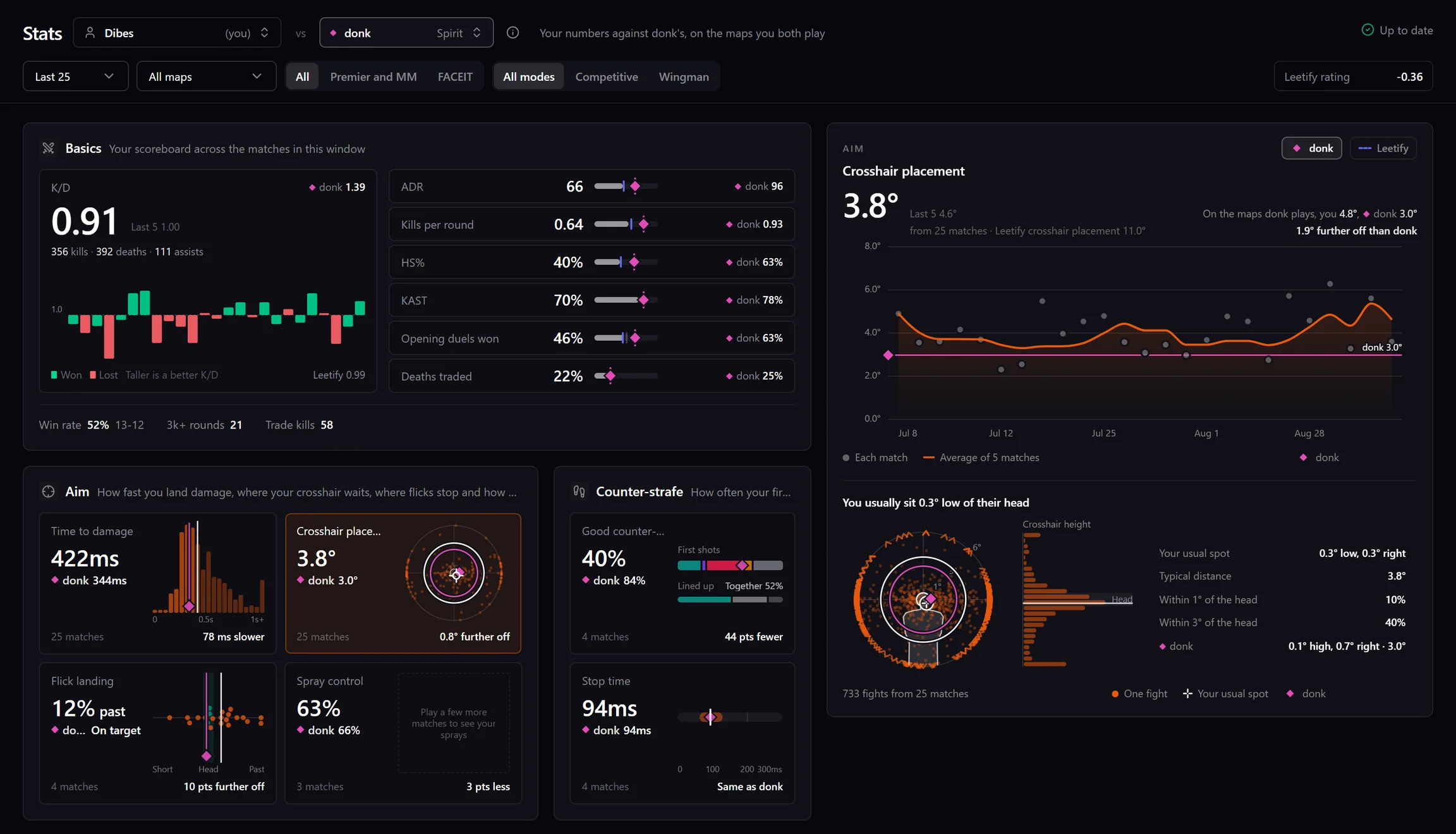
Yes. A common misconception is that CSReview only reviews one match at a time. Single-match stats and basic totals are free, and CSReview Pro includes a full cross-match Stats page with long-term trend graphs across your matches (K/D, ADR, crosshair placement scatter around the head, time to damage, and counter-strafing) that stays intact even after old video files are cleaned up.
The difference is how you act on the numbers. In CSReview you can overlay any pro player (like donk, ZywOo, or NiKo) or the Top 10, 30, or 50 teams right under your own stats on matching maps, then click straight from a weak stat into the actual fights on your POV video to see why it happened.
How CSReview and Leetify work together
- Connect Leetify once during CSReview setup (takes about ten seconds) and CSReview drops Leetify round ratings straight onto your match timeline.
- Each match saves a permanent snapshot of its Leetify stats beside your video and notes so the context still makes sense months later.
- Focus areas in CSReview let you pair a tagged mistake (like dry peeking or wide crosshair placement) against the matching Leetify metric over time.
- CSReview automatically uploads your FACEIT demos back to Leetify through Leetify’s published upload endpoint so your cloud stats stay complete without manual work.
Common questions
Do I need a Leetify account to use CSReview?
No. Leetify integration is completely optional. CSReview downloads Valve Matchmaking, Premier, and FACEIT demos directly and computes its own fight-by-fight time to damage, crosshair placement, counter-strafe, and cross-match stats locally.
How is CSReview’s crosshair placement and time to damage different from Leetify’s?
Both measure how far off the head you aimed and how fast you dealt damage after spotting an enemy, but CSReview pins every individual fight onto your timeline over your actual Steam POV recording so you can filter by your slowest or sloppiest fights and watch them at 0.5x speed.
Does CSReview keep my stat history if I delete match videos to save disk space?
Yes. Your cross-match stats, trend history, notes, and 2D/3D replays stay intact even when old POV videos are automatically cleaned up by the storage cap or shrunk to 2D-only (~35 MB).
Pair your Leetify ratings with synced POV and 2D/3D review
Free on Windows 10 and 11 with no account required. Import 5 past matches right away and get 9 full 2D and 3D replays free.
Windows 10/11 · VAC-safe · 9 full 2D & 3D replays free