Tool · 2D & 3D replay
A CS2 demo viewer that rebuilds the round, not just dots on a radar
Drop in any .dem file from Premier, FACEIT, ESEA, scrims, or HLTV and scrub every second in 2D or 3D without booting Counter-Strike 2, and you don’t need video recording or an account to use it.
Updated 2026-11-22 · Windows 10/11 · No account needed
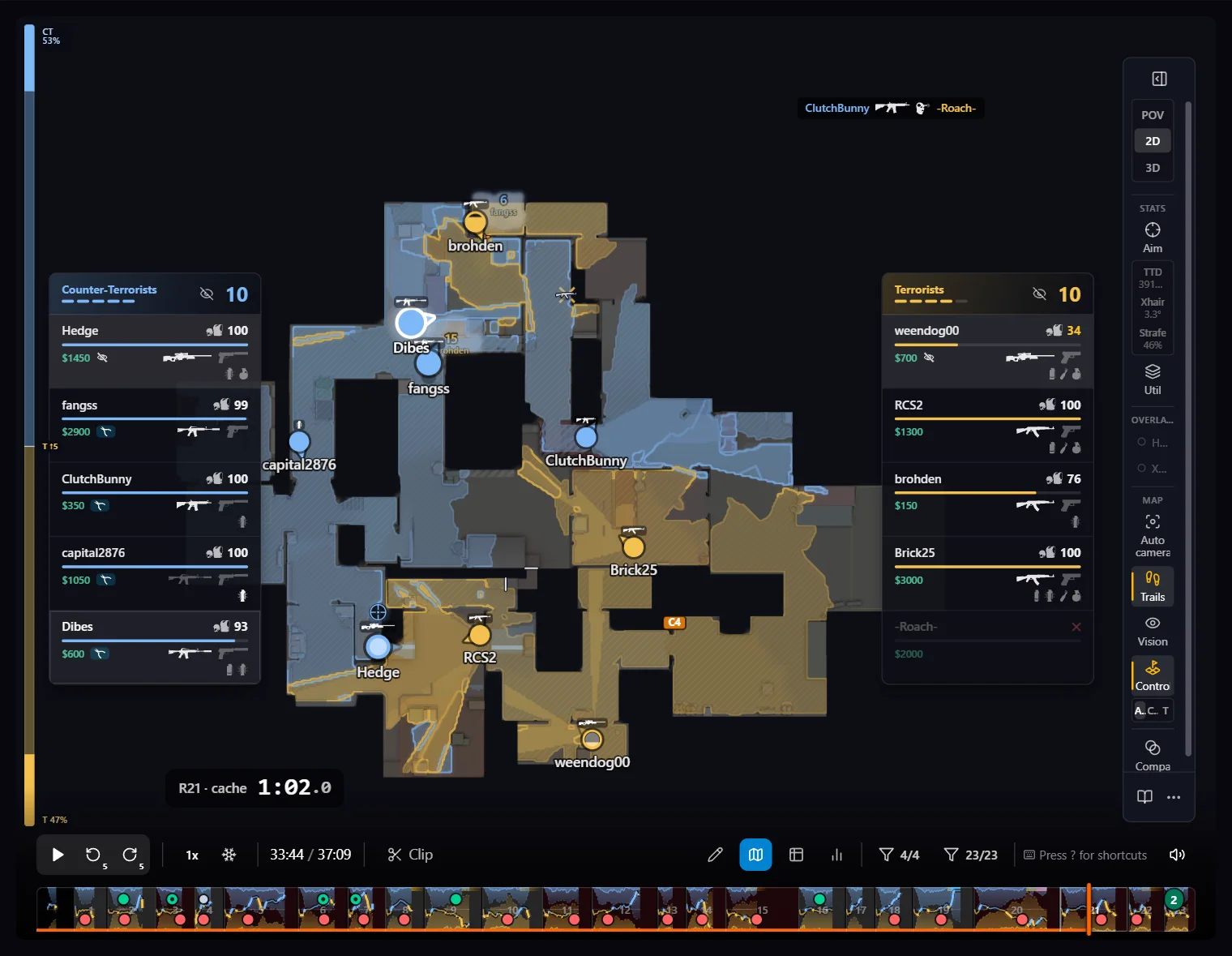
What the 2D replay shows that flat radar viewers miss
- Smokes take the actual CS2 voxel shape they filled around doorways and ledges instead of a generic circle with a timer on it, and when an HE lands in a smoke it opens a hole for about 1.2 seconds before the voxels refill over the next 0.8 seconds.
- Line of Sight (V) checks real compiled map geometry, boxes, elevation, and smoke density out to 2,800 units, so you can see the exact second someone became shootable.
- Map Control (T) paints solid ground where someone’s standing or aiming right now and hatched ground behind angles they’re watching, so nobody’s getting through without going through them, and hovering any patch tells you who’s holding it and why.
- CT Intel and T Intel (Shift+T) hide everything a team had no way of knowing from sight or sound, so you can tell whether a call was actually bad or just made without info.
- Any round switches straight into 3D inside the real map geometry with Auto camera, Free camera, Follow, or player Eyes across all ten supported maps.
Works with .dem files on their own, or synced with your POV
If you only have a .dem file from FACEIT, a scrim, a student, or a pro match, just drag it into CSReview and the 2D and 3D viewer opens on its own with round markers, clickable utility spots, flash reels, and timestamped notes.
If you also play with Steam Game Recording turned on, CSReview lines your real first-person video up on the exact same playhead, so you can click a fight on the timeline and see both your own mouse movement and all ten players on the server at the same frame.
Supported maps and demo sources
| Area | What works today |
|---|---|
| 2D and 3D replay | All 10 maps (Ancient, Anubis, Cache, Dust II, Inferno, Mirage, Nuke, Overpass, Train, and Vertigo) |
| Map Control, Line of Sight, and Intel | 8 maps (Ancient, Anubis, Cache, Dust II, Inferno, Mirage, Nuke, and Overpass; clearly greyed out on Train and Vertigo rather than faking it) |
| Automatic demo sync | Valve Matchmaking and Premier through Steam, plus FACEIT |
| Manual drop-in | Any local .dem file or zip of demos (scrims, ESEA, HLTV, teammates) |
| Platform | Windows 10 and Windows 11 desktop app (no Mac or Linux build) |
What you actually get for free
You don’t need an account to install CSReview or inspect demos, and every install gets up to nine full 2D and 3D replays free (five past matches you already played imported right away, your first new match on its own, plus three more you pick yourself). Map Control, Line of Sight, Intel, Aim review, and 3D all work on those nine, and you get three pro matches on the 2D board too.
CSReview Pro ($3.99/month or $29/year with a 7-day free trial, or $99 once, same numbers in euros in euro countries) removes the replay cap, builds replays on its own after every match, adds cross-match Stats next to the pros, and opens the whole pro match library.
Common questions
Do I have to launch CS2 to watch a demo in CSReview?
No, both the 2D replay and the 3D map view run straight inside CSReview on Windows, so jumping between rounds and kills happens right away instead of waiting for CS2 to reload ticks.
Can I open a demo I didn’t record video for?
Yeah, drag any .dem file or zip into CSReview, or import five past Matchmaking and FACEIT matches as soon as you install. Video recording is completely optional for 2D and 3D demo review.
Is CSReview VAC-safe when downloading and viewing demos?
Yes, demo parsing and 2D/3D playback never hook, inject into, or touch CS2’s memory or files. It only reads standard .dem files and Valve’s documented Game State Integration config.
Try the 2D and 3D viewer on five of your own matches today
Install CSReview on Windows 10 or 11, import five matches you already played, and poke around Map Control, Line of Sight, Intel, and 3D replay in under ten minutes.
Windows 10/11 · VAC-safe · 9 full 2D & 3D replays free