Deep dive · Fight mechanics
Measure crosshair placement, time to damage, and counter-strafing on your real POV
Seeing a match-wide average like "540 ms time to damage" or "4.2 degrees crosshair placement" tells you something was off, not which duels caused it. CSReview computes all three metrics fight by fight from the demo and puts them straight on your real Steam POV video so you can watch your slowest or sloppiest fights at half speed.
Updated 2026-11-23 · Windows 10/11 · No account needed
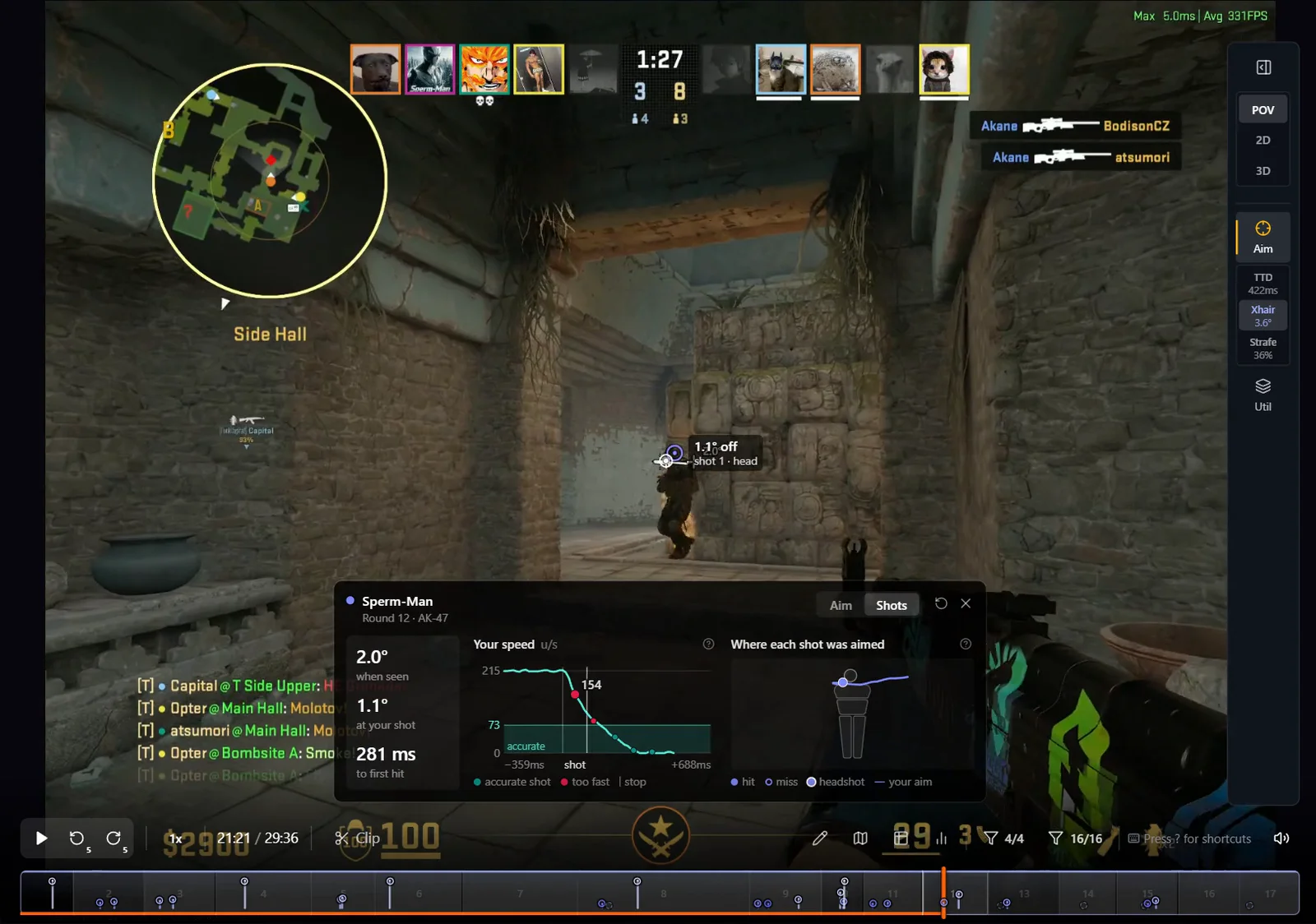
What CSReview measures on every gunfight
| Metric | How it is calculated | What it reveals |
|---|---|---|
| Time to Damage (ms) | Starts the exact tick any part of the enemy becomes visible (accounting for walls, boxes, and volumetric smokes) and stops when your first shot deals damage. | Separates genuinely slow reactions from wide pre-aim flicks that add 150+ ms before your first bullet lands. |
| Crosshair Placement (degrees) | Measures how far off the center of the enemy’s head your bullet trajectory sat at first sight, with recoil factored in. | Shows whether you are consistently aiming too low, too tight to the wall, or drifting off head height while clearing angles. |
| Counter-Strafe Speed (u/s) | Records your exact horizontal movement velocity when your first bullet left the barrel (rifles need roughly under 73 u/s for accurate first-shot bloom). | Catches lucky running headshots and rushed peeks where firing 40 ms too early threw the duel. |
Go beyond numbers with Swing Check and Their View
- Filter your match timeline by slowest Time to Damage, worst Crosshair Placement, or missed Counter-Strafe to review your five worst gunfights in under three minutes.
- Use Swing Check to pause on any angle you held and send a full-speed ghost peeking around the corner so you can see immediately whether you held too tight for human reaction time.
- Use Their View (Pro) to replay your kills through the eyes of who you killed and your deaths through the opponent’s screen, making bad peek geometry obvious in seconds.
- Compare your career aim trends (TTD, crosshair placement scatter around the head, and counter-strafing) side by side against any Tier-1 pro or the Top 10, 30, and 50 teams on Pro.
Common questions
Why review aim on a real Steam POV recording instead of only a GOTV demo?
64-tick server demos smooth out rapid mouse micro-adjustments and drop your exact monitor timing, HUD, and voice comms. Pairing demo-computed aim metrics with your real Steam Game Recording shows both the exact numbers and what your hand actually did.
Does Aim review work on CSReview’s free tier?
Yes. Fight-by-fight Time to Damage, Crosshair Placement, Counter-Strafe speed, timeline filters, and Swing Check all work on every one of your 9 free 2D/3D replays (including the 5 past matches you can import on day one).
What movement speed counts as a good counter-strafe in CS2?
For rifles in CS2 you generally want your horizontal speed below roughly 73 units per second when the first shot leaves; firing while moving at 120 to 215 u/s causes heavy inaccuracy even when your crosshair looks on target.
Check your own crosshair placement and time to damage on five matches free
Install CSReview on Windows 10 or 11 with no account, import five recent Premier or FACEIT games, and jump straight to your slowest fights.
Windows 10/11 · VAC-safe · 9 full 2D & 3D replays free