Workflow · Coaches, analysts & IGLs
Review a student’s CS2 demo and hand back clickable notes without giant uploads
You don’t need a student’s Steam login or a 5 GB video upload to coach a match. Drag their .dem file into CSReview, scrub in 2D or 3D with Intel and Map Control, render their first-person POV straight out of the demo if you want smooth video without fighting demoui, and send back a tiny notes file that lands on their own match.
Updated 2026-11-22 · Windows 10/11 · No account needed
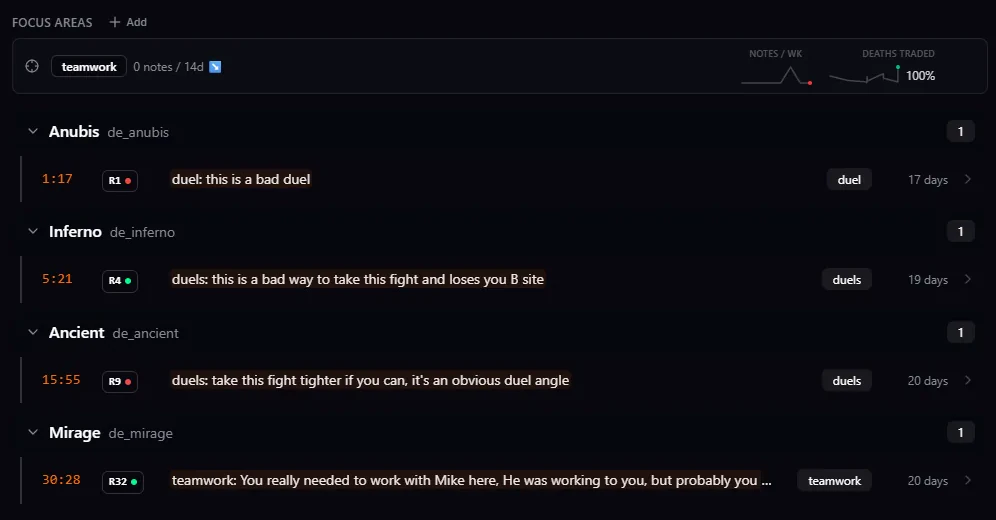
How the student review loop works
- Drop in the student’s .dem file (or a full .csreview match package if they want you to hear their comms and see their live POV). You never need them signed into Steam on your PC.
- Scrub rounds in 2D or 3D, flip between Overview, CT Intel, and T Intel (Shift+T) plus Line of Sight (V) so you can separate bad reads from missing info, draw right over the board, and press Ctrl+N to save timestamped notes with board snapshots.
- Right-click the match and pick Export review notes to save a tiny .notes.csreview file (usually a few kilobytes, plus any snapshots you took) and drop it in Discord or Metafy.
Render a student’s POV video straight out of a .dem file
If a student only sends a FACEIT or Premier .dem file with no recording, you don’t have to fight demoui seek lag during a live call just to check their crosshair placement and peeks. On Pro you can pick any player in the demo and render a 1080p POV video straight out of CS2, already synced frame for frame with the 2D and 3D board, real smokes, line of sight, and aim stats.
You can render the whole match, click and drag to pick only the key rounds you plan to cover, or switch to Only while alive to skip freeze time and dead time. You can also render Their View to show a student what the enemy actually saw on kills and deaths, which makes peeking and angle mistakes click right away.
What your students need (and don’t need)
Students can grab CSReview for free on Windows 10 or 11 with no account, open the notes you sent back, click any note to jump right to that timestamp on their own footage, and save clean board PNGs.
Whenever you want to send a whole match with your own POV or pre-built replay for someone who doesn’t have the game locally, Export match package packs the full match into one file. Everything stays local files you own, and students never need a paid plan just to read your notes.
Handy for IGLs and team sessions too
- Draw plays, trade spacing, and smoke gaps straight onto the 2D board and save or copy board PNGs for your team Discord.
- Check real voxel smoke edges and HE timings instead of arguing over whether a gap actually existed in a scrim.
- Open Tier-1 pro matches inside the app on the same 2D board to show anchors or riflers how pros play the exact same default.
- Upload review videos straight to YouTube with your notes automatically turned into clickable timestamp chapters.
Plain details on licensing
One Pro licence activates on one Windows PC at a time, and every student already gets up to nine full 2D and 3D replays free plus unlimited POV recording and note viewing on the free app. If you coach CS2 regularly and want to try Pro on a batch of student demos before deciding, drop into the CSReview Discord and ask.
Common questions
Can I review a student’s FACEIT or Premier .dem file without connecting their account?
Yeah, just drag any .dem file or zip into CSReview and it builds the 2D and 3D replay locally with no student login required.
Can I watch a student’s first-person POV if they only send a .dem file?
Yes, on Pro you can render any player’s 1080p POV video straight out of their .dem file (all rounds, specific rounds, or only while they’re alive), and it lands on the exact same timeline as the 2D and 3D replay so you can scrub it instantly without demoui.
How big is an exported review-notes file?
Export review notes skips the video and replay archive and only packs your notes, match ID metadata, and any board snapshot pictures, so the .notes.csreview file is usually a few kilobytes (or a couple hundred kilobytes with snapshots) and drops straight into Discord.
Does my student need Pro to read the notes I send back?
No, reading imported notes, clicking timestamps on their own footage, and watching any match they already recorded or built a replay for all work on the free app.
Try it on a student demo today
Drop any .dem file into CSReview on Windows 10 or 11, drop a few Ctrl+N notes with board snapshots, and export a lightweight notes file in one click.
Windows 10/11 · VAC-safe · 9 full 2D & 3D replays free