CS2 review for Windows
Your PoV.
The whole round.
In sync.
CSReview records your PoV after every match, pulls the demo and lines the two up frame for frame. Below is a real round running in the app, so go ahead and press the keys.
Download for WindowsFree to start · No account · Windows 10/11 · v3.15.0
Watch me win this fight in apartments. I’m dead half a second later, and the round stops right there so you can find out why.
Your PoV
AIMR12 · 1:27 · de_ancient
Every fight, measured
on your own footage.
- when seen
- 2.0° off
- at the shot
- 1.1° off · head
- to first hit
- 281 ms
- moving at
- 154 u/s · too fast
- Time to damage
- Starts the moment any part of them comes into view, with walls and smokes counted, and stops at your first hit, so a slow one tells you whether you saw them late or just took too long once you had.
- Crosshair placement
- How far off the centre of their head your bullets would've gone when they showed up, recoil included, so it's where the shot was really headed and not just where the crosshair looked like it sat.
- Counter-strafe
- Whether you'd actually stopped when the first bullet left, and whether you sat there too long once you had, so a shot that missed on the move reads differently from one that was just late.
Pick one of the three and the timeline marks every fight by it, so you can jump straight to the slowest and sloppiest ones. The card above is on Shots, your speed as each bullet left and where it was aimed on their body, and the Aim tab swaps that for your crosshair's path to their head with the fight replayed from above.
Aim works on any match with a 2D replay, the eight free ones included. Fights are worked out from the match demo against the real map geometry and CS2's own smoke shapes, and prefires or fights you were already shooting into stay out of your time to damage.
STATSLast 25 matches
Your numbers,
right next to donk's.
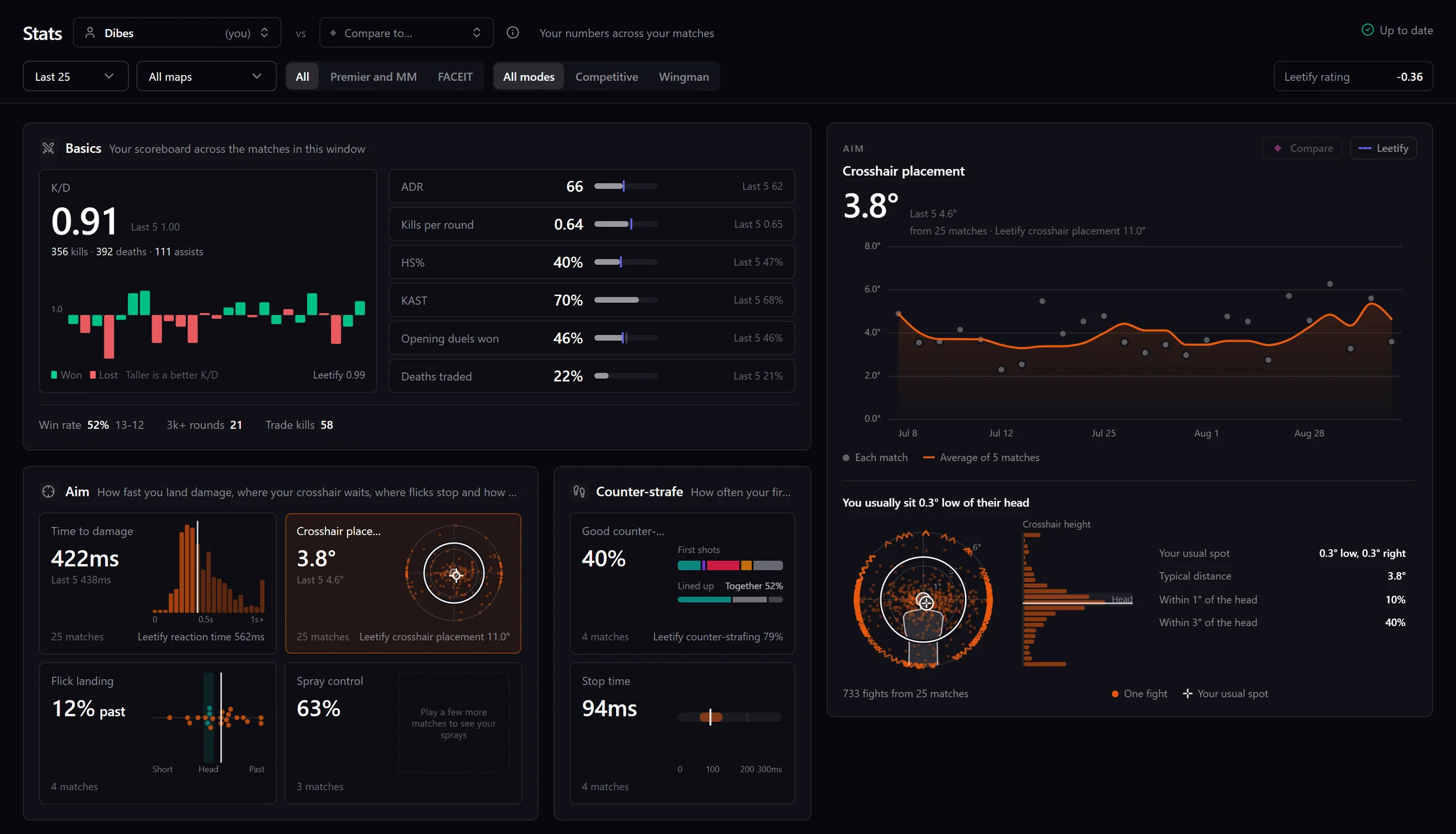
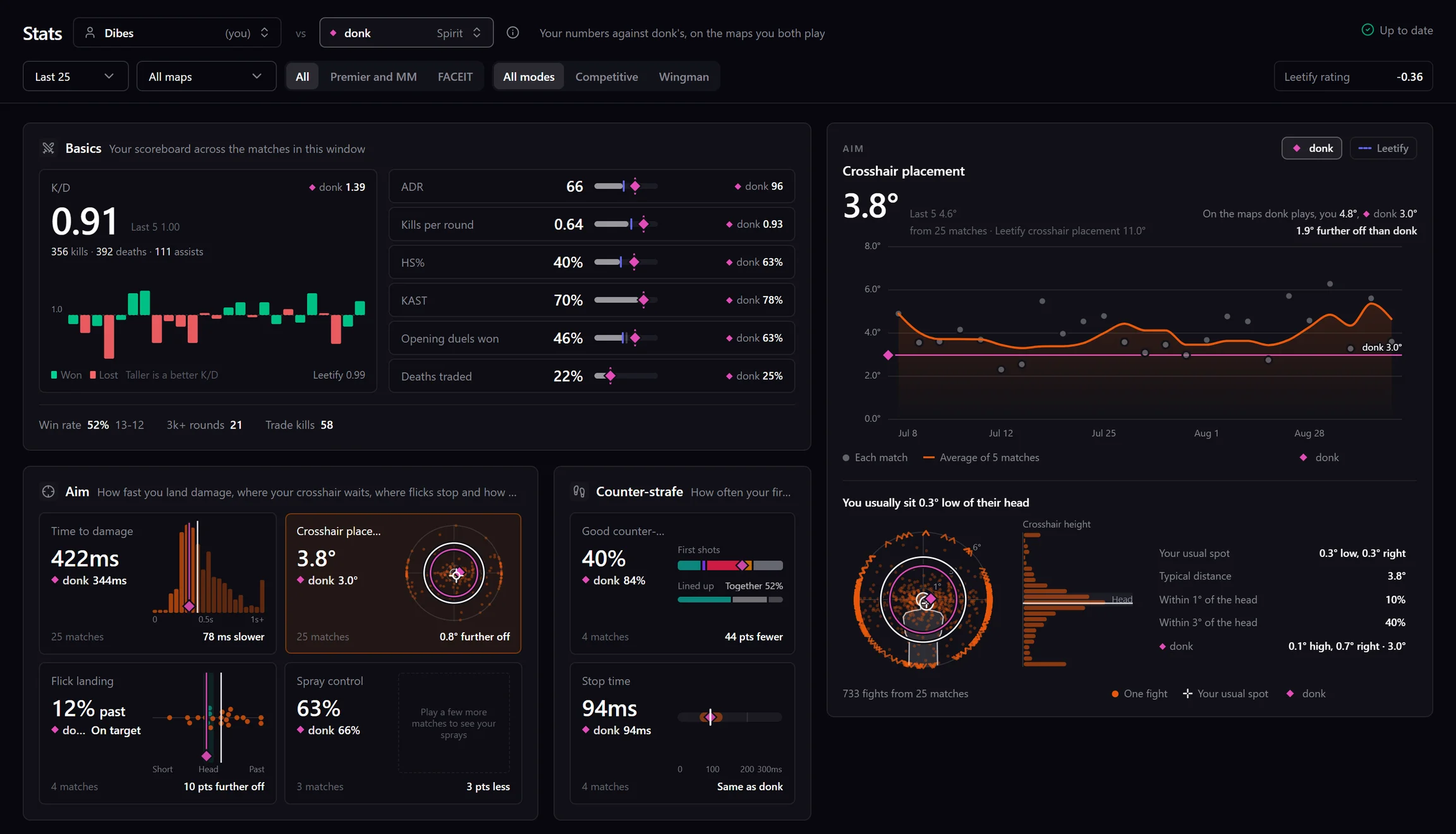
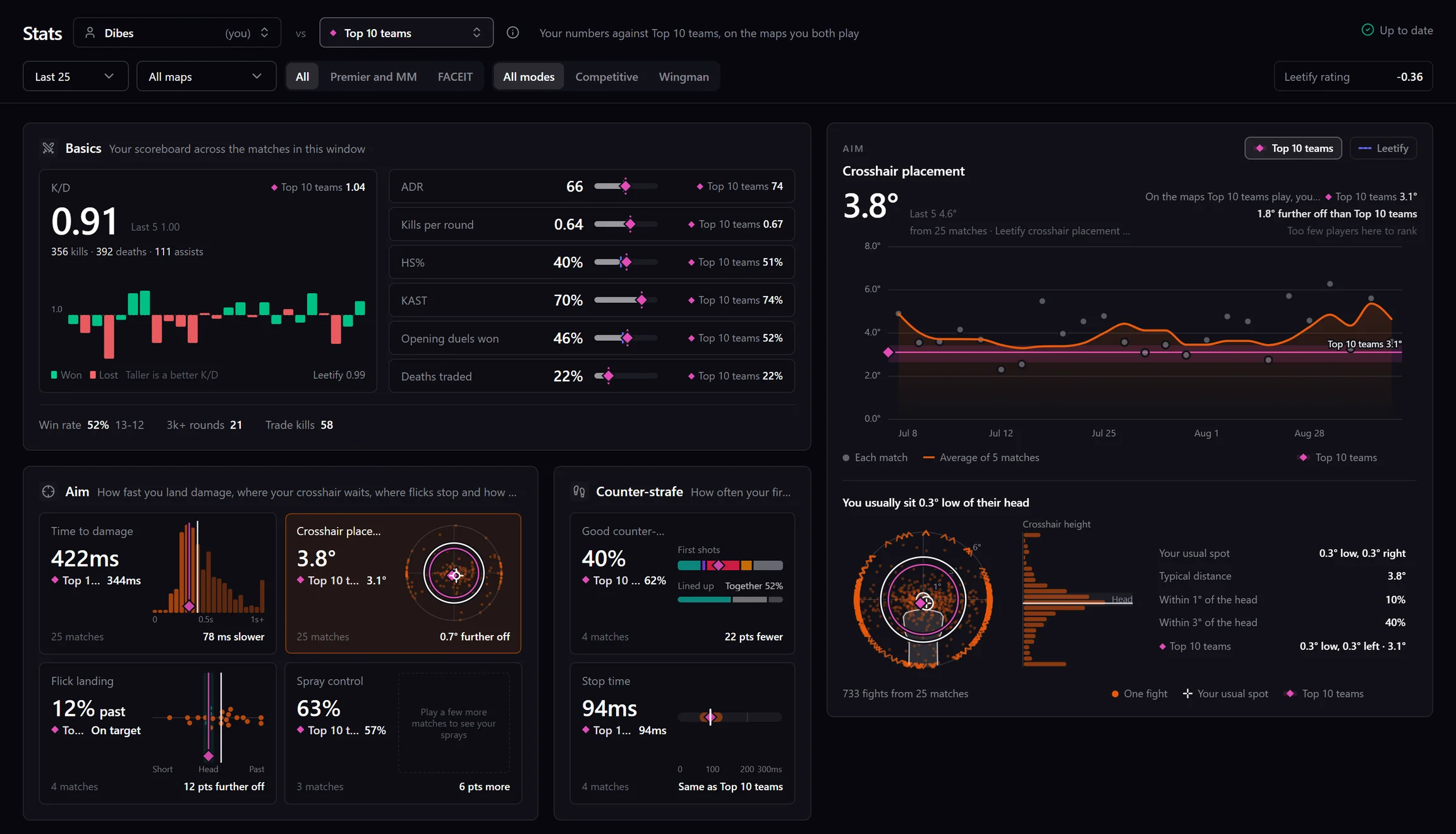
The last 25 matches with crosshair placement open, 3.8° on average and usually sitting a little low of the head, with every fight as a dot around it.
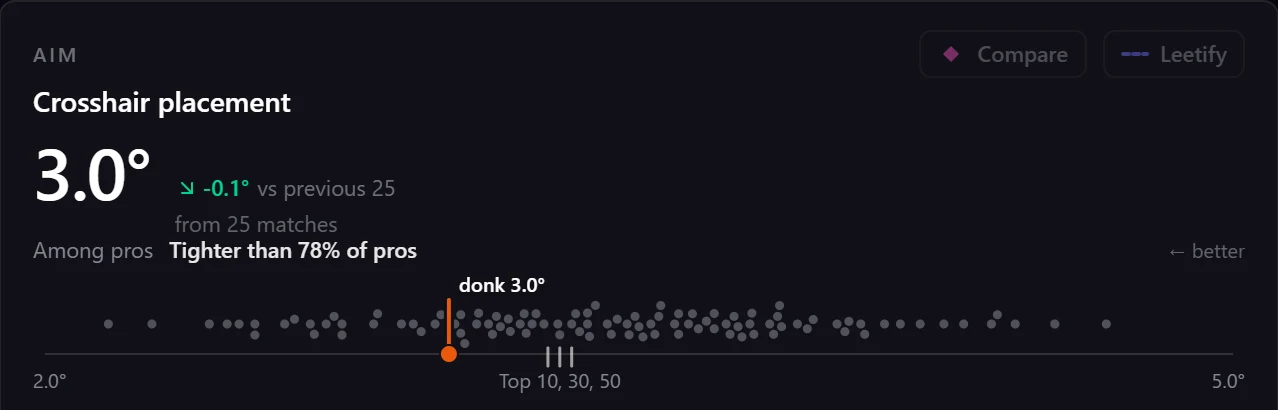
Pick a pro from the player menu instead and the whole tab is theirs. This is donk's last 25 pro maps, with every other pro as a dot on the strip and his 3.0° tighter than 78% of them.
- Out of your own demos
- Time to damage, crosshair placement, counter-strafing, flicks and sprays come out of the same fights as the Aim tool, so you can open the match behind a number and watch those fights yourself.
- Any pro, or a whole tier
- Compare with donk, m0NESY or anyone else in the pro list, or with every player on the top 10, 30 or 50 teams, and it's always matched to the maps you actually play.
- The people in your games
- The player menu lists everyone you've played with and against, so you can see how your duo's numbers stack up, or what the guy who dropped 30 on you actually does.
- Kept after the video's gone
- Your numbers stay when you delete a recording or trim it to 2D, and Leetify's sit alongside, labelled, if you've linked it.
Stats comes with Pro. Free installs still collect the numbers from every match they convert, so the whole history is there the day you upgrade. Pro numbers come from top-tier matches over the last six months, and a tier is every player whose team was ranked that high when they played.
AUTOMATIC
It's all waiting
when the match ends.
- Your PoV
- Steam's own Game Recording does the recording and CSReview cuts your match out of it, even if the app was closed when you finished, and it stitches the halves back together if you reconnected.
- The demo
- Matchmaking and Faceit demos come down on their own and get parsed in the background, and all of it stops while you're in a game so your frames are left alone.
- Day one
- Connect Steam or Faceit when you install and it pulls in five matches you already played, so there's something to review before you queue again.
- Your library
- Every match lands with the score and your stats on it, one key keeps it, files it or bins it, and the notes, moments and clips are all waiting inside.
Recording needs Steam's Game Recording with background recording switched on. Setup checks that live, along with CS2 being connected and CSReview starting with Windows, so you know your next match gets saved. Windows 10 and 11 only.
MORE
There's a lot more
in there.
- Moments
- Kills, deaths and swings in map control get flagged on their own, and [ ] walk you through them.
- Review a match in ten minutes
- Pick a time budget and it builds a short sitting from the rounds worth your time, with one question to answer after each clip.
- Notes and focus areas
- Timestamped notes with tags, gathered across every match, and focus areas that track a habit next to the matching Leetify stat.
- Compare rounds
- Stack up to twelve rounds on the same map, one colour each, and the execute that broke is the line that doesn't match.
- Util on the timeline
- Turn on Util and your flashes and HEs land on the timeline, taller the more they did to the enemy.
- A guide on your own match
- Guide lays your match out round by round, and picking a death walks you through it on the map with your killer and nearest teammate marked.
- Clips and drawing
- Draw on the board and paste it straight into Discord, or cut a clip and send it to YouTube with your notes as chapters.
- Share a match
- Export a match as one file with your PoV, the replay and your notes, and the notes a friend sends back land on your copy.
- Faceit and Leetify
- Faceit matches sync by themselves and Leetify's round ratings sit right on your timeline.
Pros comes with Pro. Every tool inside the replay works on any match that has one, compare rounds and 3D included. 3D runs on all ten maps and downloads each one the first time you open it, map control, line of sight and fog of war run on Ancient, Anubis, Cache, Dust II, Inferno, Mirage, Nuke and Overpass, and the flash list works on any parsed demo.
PRO
Eight matches free. See the whole round.
FREE
$0
No account · 8 free 2D replays
- Five matches you already played, imported the day you install
- Three more 2D replays on whichever matches you pick
- Map control, line of sight, fog of war, Aim and 3D on all eight
- Automatic POV capture after every match
- The full review player, so round timeline, moments, drawing and clips
- Notes, focus areas, the library and auto-filing
- Faceit, Leetify, Steam and YouTube
PRO
Lifetime is a one-off. No subscription.
- Unlimited 2D replays, built for every match on their own
- Stats across every match, next to any pro or the top 10, 30 or 50 teams
- Every replay tool on all of them, Aim and 3D included
- Professional matches, with team, event and map filters
- Import as many old matches as you want, not five
- Boards built ahead of time, so they open the second you ask
- Convert to 2D only, so you keep the match and drop the video file
- Clip exports with no CSReview badge on them
Already downloaded? You can upgrade from inside the app.
Map control, line of sight and fog of war run on Ancient, Anubis, Cache, Dust II, Inferno, Mirage, Nuke and Overpass. Train and Vertigo get the full 2D replay, and the app tells you plainly that those three aren't there yet. The five imports and the three conversions are separate, so spending one never touches the other, and neither expires. Stats keeps collecting on the free tier, so your history is waiting when you upgrade. Clips exported on the free tier carry a small CSReview badge and Pro exports are clean. One licence activates one PC.
FAQ
Questions, answered.
Is this safe to run? Will it get me banned?
CSReview never touches the running game. It doesn’t inject anything, hook it, or read its memory, and it doesn’t change a game file. Steam’s own Game Recording does the recording and CSReview reads what Valve already wrote to your disk. Matchmaking demos come from Valve’s own demo servers, and Faceit demos come down through your own logged-in Faceit session. It won’t even open a Steam session while you’re in a game, because that would kick you out of your own match. The only thing it puts in your CS2 folder is a Game State Integration config, which is Valve’s documented way of letting an app be told the score. Everything else is worked out from the demo file, after the match is over.
What do I actually get for free?
Eight matches on the 2D board with everything turned on, and they come from two separate pots. Connect Steam or Faceit when you install and CSReview lists the games you already played, and you can import five of them straight away. On top of that you get three conversions to spend on whatever you like, and spending one never touches the other five. Every tool inside the replay works on all eight, so map control, line of sight, fog of war, Aim and 3D. Automatic POV capture, the review player, moments, notes, focus areas, the library, clips and integrations remain available after those credits run out. Pro adds unlimited conversions, Stats and professional matches.
I just installed it. Do I have to go play a match first?
No. Connect Steam or Faceit and CSReview shows you the matches you already played, then downloads and builds the 2D replay for five of them. You can be watching your own games on the board in the first ten minutes rather than after the next session. Those five are free and they don’t come out of your three conversions.
Does it run on Mac or Linux?
No. Windows 10 and 11 only, and there is no Mac or Linux build. It’s a direct download rather than a Steam or Microsoft Store app, and it updates itself after that.
Does it work with Faceit and Matchmaking demos?
Both, and they get picked up on their own. Setup walks you through connecting Steam, Faceit and Leetify once, and after that you never think about it again. You can also drop in any .dem file or a zip of them, so scrims, a teammate’s game and pro demos all work too.
Which maps do the analysis layers work on?
Map control, line of sight and fog of war run on eight maps, so Ancient, Anubis, Cache, Dust II, Inferno, Mirage, Nuke and Overpass. The 2D replay itself works on ten, those eight plus Train and Vertigo, and on those two the app greys the buttons out and tells you why rather than pretending.
18 more questionsFewer questions
How does CSReview measure my aim?
From the match demo, fight by fight. Time to damage starts when any part of the enemy comes into view, with walls and smokes counted, and stops at your first hit. Crosshair placement is how far your bullets would have gone from the centre of their head at that moment, recoil included. Counter-strafe checks whether you’d stopped when the first shot left. Every fight lands on your timeline, so you can click the slow ones and watch them at half speed with the numbers right on the picture.
Can I compare my stats with pro players?
Yes, that’s part of Pro. Pick any pro from Compare to in Stats, or every player on the top 10, 30 or 50 teams, and their number sits beside yours on every stat, aim and counter-strafing included, matched to the maps you both play. You can also open any pro’s own page and see their trend and recent maps the same way you see yours.
Is there a 3D replay?
Yes. Any match with a 2D replay can switch to 3D, which plays the round inside the real map with the smokes and fire CS2 actually drew. Auto camera keeps the fight in frame, or you can fly the camera yourself, follow one player or watch through their eyes. It works on all ten maps, and each one downloads the first time you open it.
What happens after my free replays run out?
Nothing you already built goes away. Every match you spent one on keeps its 2D replay for good, and re-opening one costs nothing. New matches keep arriving with your POV cut and marked up, they just don’t get a board until you go Pro, which removes the limit and builds one for every match on its own in the background. They don’t expire, and a conversion that had nothing to convert doesn’t spend one.
How do I review my CS2 matches with CSReview?
Install it once and it runs quietly in the tray. After every match your POV gets cut out automatically and the demo comes down in the background, so the review is already waiting when you want it, with your footage on one side and a 2D replay of the whole server on the other, both on the same playhead. You just open it and watch.
What makes the 2D replay different from other demo viewers?
Other viewers play the demo back. CSReview rebuilds the round. Smoke takes the shape it actually took instead of a circle with a timer on it, walls and boxes and height block vision the way they blocked it in game, and map control will tell you who is holding any piece of ground and why. It also runs right next to your own footage, lined up frame for frame with the moments your own shots show up in the video, so you can flip between what you saw and what was really happening without losing your place, and any round can go 3D inside the real map too.
What does the map control overlay actually show?
Which team holds which ground as the round plays out. Solid colour means a body standing on it or a gun trained down it, and hatching means ground a side got to first and is still watching every way into. Hover any of it and the app tells you who is holding it and why, and you can flip the whole board to Overview, CT Intel or T Intel to see the round the way either team could actually have known it.
Do I have to record my matches myself?
No. CSReview is built on Steam Game Recording, so Valve does the recording and CSReview just reads what it wrote, and it never touches your game. If the app was closed when a match ended, it rebuilds that match from Steam’s own recordings on the next launch, before Steam deletes them. The one thing you turn on is “Save background recordings” in Steam’s own Game Recording settings, once. The app checks for it on first run and puts a button in front of you that opens the right page.
What if the app wasn’t running when I played?
It catches up. On the next launch it goes through Steam’s own recordings, finds the matches with no video, and rebuilds them from whatever survived, before Steam’s cleanup gets there.
What if I got disconnected and rejoined?
When a reconnect splits your match into two recordings, it works out that the second one continues the first, joins them without re-encoding, and re-times the events in the back half.
Is CSReview free?
Yes, with no account. Automatic POV capture, the full review player, moments, notes, focus areas, the library, clips and every integration are free with no limit. On top of that every install gets eight 2D replays, five imported from matches you already played and three you pick yourself, with every replay tool working on all of them. CSReview Pro ($3.99/month, $29/year, or $99 once) drops the limit, builds a board for every match on its own and opens up Stats, where your numbers sit next to the pros’.
How is it different from Leetify?
Leetify tells you what is going wrong across your matches, and CSReview shows you the round where it happened, in your own footage with the map next to it. CSReview measures your aim and counter-strafing itself, from fights you can click and watch, and Leetify’s ratings and stats sit right alongside, clearly labelled. They work together rather than competing.
Will it hurt my frame rate?
No. It stops completely while you are in a game, and the rest of the time the heavy work happens in the background without taking the machine off you.
What if I run out of disk space?
Set a storage cap and old videos clean themselves up, with the ones you protect left alone. On Pro you can also convert any match to 2D only, which drops the video and keeps the match audio, your notes, the markers and the full 2D replay. A 4.5 GB match comes out around 35 MB and is still completely reviewable.
Do I have to download my Faceit demos myself?
No. Your Faceit matches sync on their own and the demos come down without a browser window ever appearing on your screen. It waits out the post-match processing countdown and picks the demo up when it’s ready.
What does Leetify add inside CSReview?
Round ratings land on your timeline, and each match keeps its own permanent snapshot of the stats next to the video, so it still makes sense months later. Your focus areas track against the matching Leetify stat too. Faceit demos upload back to Leetify on their own as well, through an endpoint Leetify published for exactly this. Connecting it during setup is the smoothest path, and it takes about ten seconds.
What happens to a YouTube upload if the app crashes?
Nothing. A crash, a quit or a power cut doesn’t lose it, and the upload is still queued up waiting on the next launch. Your notes go along as timestamped chapters.
Can I invite a friend?
Yes. Every install has an invite link on the Pro page and in Settings. A friend who installs CSReview and enters your code gets three more replays straight away, or five if you’re on Pro. On the free plan you get three more once they play a match after claiming your code and it gets its 2D replay, and on a monthly or yearly plan your next renewal moves back a month once they start paying for Pro. Codes work once per Steam account and once per PC, and to stop people inviting themselves CSReview sends a one way hash of your PC’s Windows ID when you make or claim a code. It’s used for nothing else.
MATCH OVER · 13 – 10
Go and watch the next one properly.
Install it once, pull in five matches you already played, and every match after that comes back cut and marked up whether or not you remembered to want it.
v3.15.0 · Windows 10/11 · No account · Auto-updates